Deploy a Windows VPS in Karachi with full Administrator RDP access, KVM virtualization, NVMe SSD storage, a dedicated IPv4 and up to 1 Gbps connectivity. Choose Windows Server 2025, 2022 or 2019 and manage the VPS through our web-based control panel. The service is unmanaged, giving you full control over Windows, applications, users and firewall settings.
Windows Server VPS with Administrator RDP access, KVM virtualization, NVMe SSD storage, dedicated IPv4 and Windows licensing included.
Monthly billing. No setup fee. Eligible orders are normally deployed within a few minutes after successful payment verification. Some orders may require manual review. No refund after activation โ view refund policy.
CPU platform depends on the node assigned to your VPS.
A Karachi Windows VPS gives you a dedicated Windows Server virtual machine that can be accessed remotely through RDP. You receive Administrator-level access, so you can install compatible software, create Windows users, configure Windows Firewall, manage services and control the operating system according to your workload.
The VPS runs on KVM virtualization with NVMe storage and allocated virtual resources. KVM provides virtual-machine isolation while the underlying physical server is shared between VPS instances unless a dedicated hardware service is specifically purchased.
Hosting the VPS in Karachi can reduce network distance for users connecting from Pakistan compared with many overseas locations. Actual RDP responsiveness depends on the user's ISP, routing, congestion, software workload and server resource usage.
Use only software and workloads permitted by the applicable license terms and our Acceptable Use Policy.
Access a full Windows Server desktop remotely using Administrator RDP for approved business and administration tasks.
Run supported accounting, ERP and office applications for authorized users connecting to the server remotely.
Run authorized Windows-based market data or financial applications. Test the actual application endpoint before choosing a location for latency-sensitive use.
Host supported IIS, ASP.NET, database-backed applications and internal web tools where Windows Server is required.
Create Windows development, QA or testing environments with Administrator access and isolated server configuration.
Run approved applications used by remote staff where centralized Windows access is useful. Multi-user licensing and RDS requirements must be handled separately where applicable.
Template availability can vary by node. Confirm a specific version before ordering if it is mandatory for your software.
The exact CPU family depends on selected node capacity and availability.
Selected dual-socket Intel Xeon nodes are available for general Windows Server, RDP and business application workloads.
Selected AMD EPYC nodes provide high core density and strong virtualization capability for server and application workloads.
Selected Ryzen nodes are suitable for workloads that benefit from strong per-core performance and responsive remote desktop operation.
Need a specific CPU family? Confirm current Karachi node availability with sales before placing the order.
After deployment, connect to the Windows VPS using Microsoft Remote Desktop or another compatible RDP client. Administrator access lets you configure Windows Server, install compatible software, create local users, manage services and adjust Windows Firewall rules.
RDP performance depends on your local internet connection, network route, server load, screen resolution, application workload and selected VPS resources. For heavier Windows applications, choose a plan with sufficient RAM and CPU capacity.
Use the web-based VPS panel for common server operations and troubleshooting.
Manage server power without needing to log in to Windows.
Reinstall a supported Windows Server template when a clean deployment is required.
Troubleshoot the VPS when RDP is unavailable or Windows networking is misconfigured.
Review CPU, memory and network usage from the server dashboard.
Review assigned addressing and supported network configuration details.
Check whether your VPS is running and access management controls from one place.
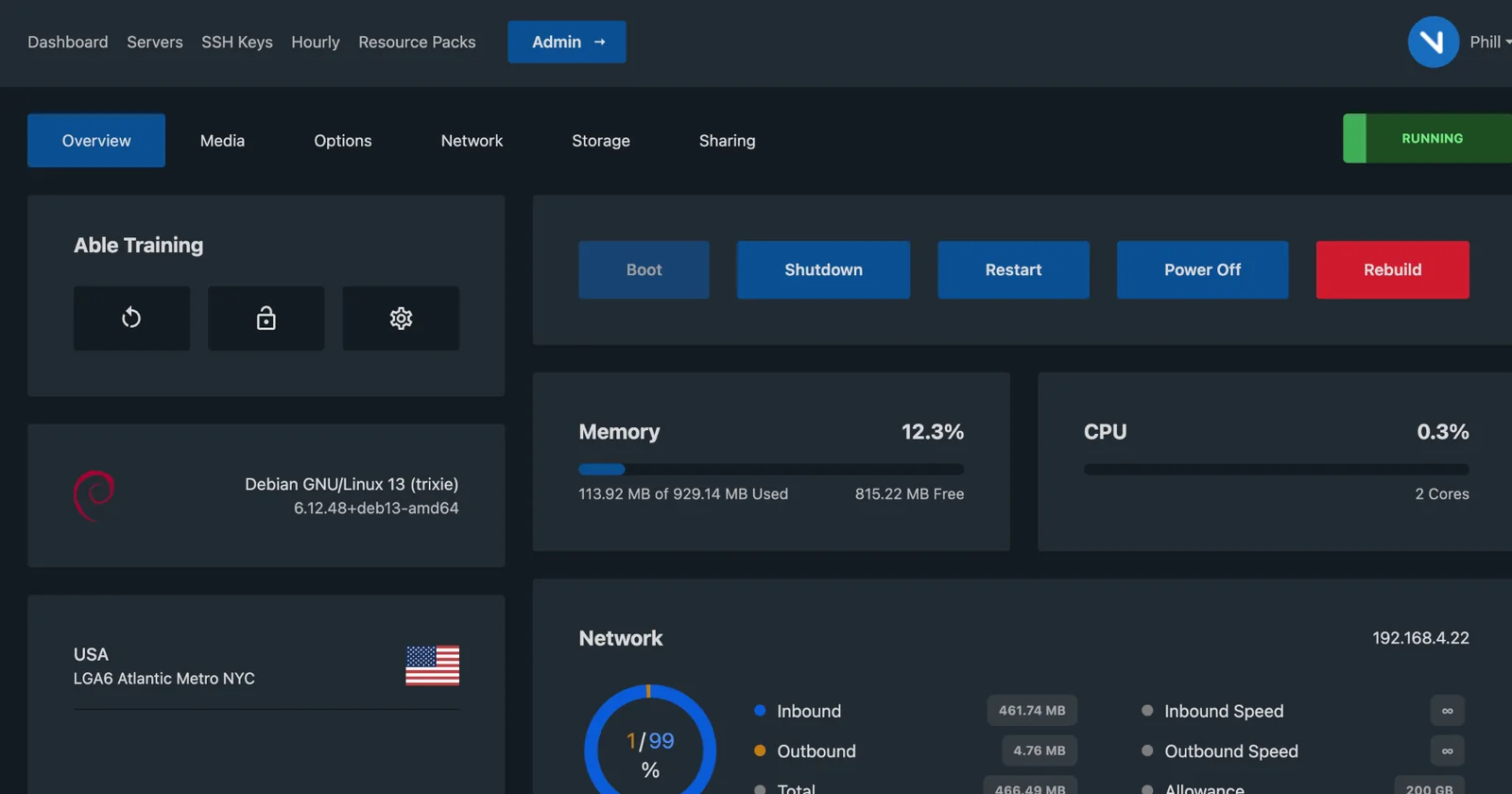
Each Windows VPS runs as an isolated virtual machine with its own operating system and allocated virtual resources. Physical host hardware remains shared between VPS instances unless otherwise stated.
Administrator access lets you configure Windows Firewall rules, services, RDP access policies and other Windows security settings.
Network-level filtering helps mitigate supported volumetric attacks. Protection capabilities depend on attack type and network conditions.
Backups are your responsibility. Automatic off-server backups are not included with the standard unmanaged service. Use Windows-compatible backup software, application backups or off-server storage for important data.
Snapshots are available for point-in-time recovery before major changes. They are useful for short-term rollback but should not replace an independent off-server backup strategy.
Choose the operating system that matches your application stack and administration requirements.
| Requirement | Windows VPS | Linux VPS |
|---|---|---|
| Remote Desktop GUI | Native RDP | Usually SSH / optional GUI |
| Administrator / Root | Administrator | root |
| Windows-only Software | Suitable | Usually not suitable |
| Linux Web Stack | Possible but less common | Common choice |
| Windows Server License | Included on our Windows plans | Not applicable |
| Typical Administration | RDP + PowerShell | SSH + shell |
Need Linux instead? View Karachi Linux VPS โ
Displayed PKR values are approximate. Applicable amount and exchange rate are confirmed during payment processing.
Choose a Windows VPS location based on your users, application endpoints and network requirements.
Choose an international location when your audience or application endpoint is closer to another region.
A Karachi Windows VPS is a virtual Windows Server hosted on infrastructure located in Karachi. It includes Administrator RDP access, KVM virtualization, NVMe storage and a dedicated IPv4.
Yes. Windows VPS plans include Administrator-level RDP access so you can configure Windows Server and install compatible software.
Supported templates include Windows Server 2025, Windows Server 2022 and Windows Server 2019. Availability may vary by node.
Yes, Windows Server licensing is included on the Windows VPS plans shown on this page.
Depending on node and availability, Windows VPS instances may run on Dual Intel Xeon E5 v3/v4, AMD EPYC Milan/Genoa or AMD Ryzen 5000/7000/9000 series hardware.
No. The service is unmanaged. We manage the underlying physical infrastructure while you manage Windows, applications, firewall rules, updates, users and backups.
Eligible orders are normally deployed within a few minutes after successful payment verification. Some orders may require manual review.
Automatic off-server backups are not included with the standard unmanaged VPS service. Backups are the customer's responsibility. Snapshots are available for point-in-time recovery.
Supported Windows Server templates can be rebuilt or reinstalled through the VPS management workflow. Reinstallation erases the existing VPS data, so back up anything important first.
Windows Server licensing and Remote Desktop Services requirements depend on the number and type of users. Standard Windows Server administration access should not be treated as an unlimited multi-user RDS license. Confirm your licensing requirements before deployment.
Karachi Windows VPS ek virtual Windows Server hai jo Karachi mein hosted infrastructure par run karta hai. Aap ko Administrator RDP access, dedicated IPv4, NVMe storage aur KVM virtualization milti hai. Service unmanaged hai, is liye Windows configuration, software, firewall aur backups aap manage karte hain.
Review the uptime SLA, refund conditions, Acceptable Use Policy and other service terms before purchasing your Karachi Windows VPS.
Windows Server in Karachi with full Administrator RDP, KVM virtualization, NVMe SSD, dedicated IPv4 and Windows licensing included.